Original huh technology Smart Products Super cool dual-screen laptop! Lenovo Yoga Book 9i quick test, priced at $17,998, so expensive

Super cool dual-screen laptop! Lenovo Yoga Book 9i quick test, priced at $17,998, so expensive

Hello, how are you? I am the original huh, click on the attention, more exciting content waiting for you!

I've been using the Lenovo Yoga Book 9i, a two full-screen laptop, for a while now, and I'd like to answer two questions: is it a worthwhile upgrade, and is it going to set the future trend in laptops?

-

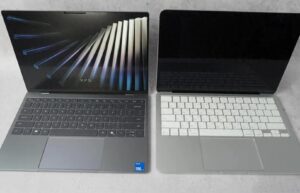
The new Yoga Book 9i aims to offer a new flip-top design with two full-screen 13.3-inch OLED displays, a detachable keyboard and a magnetic stand to support the whole ordeal. It is priced at $17,998.

What we like about it

Eye-catching design with everything you need in the box

The Yoga Book 9i boasts a striking design. In addition to featuring two full-size screens, this laptop is built with high-quality aluminum and has soft, rounded edges and corners that are both inviting and comfortable to use. At just 0.63 inches thick when closed, it's extremely thin and lightweight. Lenovo only offers it in one color - Tidal Cyan - but at least it's a nice option that should appeal to a lot of people.

-

Lenovo has three USB-C ports around the laptop that support Thunderbolt 4 connectivity, power and data transfer. There's a power button near the bottom edge and a switch to turn off the 5-megapixel webcam when you want privacy.

The hinge that connects the two monitors doubles as a speaker, which is one of the most genius design concepts I've ever seen. Previous Lenovo laptops have had similar bar speakers, and I'm glad to see the company continue to roll it out.

Of course, given the non-traditional nature of the Yoga Book 9i, you'll need a few accessories to complete the setup. Fortunately, they all come in the box and don't need to be purchased separately. You'll get a Bluetooth keyboard, Bluetooth mouse, magnetic stand, and stylus, all bundled together to give you everything you need to get started.

It's amazing what 2 screens can do for productivity

The biggest draw of the Yoga Book 9i is its dual-screen setup, which is just what you'd expect. Windows treats the screen as two separate displays, allowing you to drag content between them, align windows to their respective sides and do all the side-by-side multitasking you want.

-

The display itself is a 13.3-inch OLED panel with a resolution of 2880 x 1800. they're undoubtedly one of the best screens I've seen on a laptop in recent memory, with vibrant colors and excellent contrast thanks to the deep black levels of the OLED panel. The refresh rate is locked at 60Hz, which is a bit unfortunate; most laptops at this price point come with 120Hz panels for extra smoothness.

When you open the Yoga Book 9i, the first thing that hits you is the two screens, which are just perfect. I showed the laptop to some of my coworkers and friends and they all noticed that the display was not only beautiful but futuristic. It's unlike any laptop I've ever used before and I had the same reaction when I first saw it.

-

So, does having two screens on your laptop help? Absolutely. Sure, some people will say that one screen is enough because that's all they know, but the moment you start using the thing, you wonder how you ever lived without it.

There are several ways to position your screens. With a stand, you can support two displays horizontally and stack one on top of the other, or you can place them vertically to refer to documents and web pages. Set a Bluetooth keyboard on the bottom display and watch it turn into a regular laptop, trackpad, and more. Of course, like other 2-in-1 laptops, tent mode and tablet mode are also supported.

-

I used the Yoga Book 9i propped up on a stand for about 90% of my review and it worked great. I liked being able to flip it vertically to one side so that press releases and reviewer's guides could be displayed full-screen as I worked on a story, and placing them horizontally meant that I could play video on one and my work on the other. This mode also helps reduce the need to bend over to look at the screen: if you have all the important content you're working on at the top, everything will be roughly at eye level, which is great for my posture.

There are multiple swipe gestures to move content between screens, and you can drag and drop whatever you need on the surface. It feels like having a second monitor with you at all times - because it is. It's a secondary display for your laptop, and it's indispensable for mobile productivity.

-

You can even have content spill over onto two screens, such as web pages and videos. I really don't recommend it because the hinge gets in the way, but it's still a cool trick.

I left my 16-inch MacBook Pro at home several times while testing the Yoga Book 9i. My MacBook is by far the best laptop I've ever used, but I didn't miss it as much when I used the Yoga Book 9i and its dual screens. I have more room to get things done, which is different from day and night. When I know I'm going to be dealing with a lot of things one day, I'm definitely going to bring Lenovo instead of Apple. It's that good.

Very good performance

My daily habits, and the Lenovo Yoga Book 9i's specs are perfectly suited for it all. At the time of my review, the laptop came with a 13th Gen Intel Core i7 processor, Iris Xe integrated graphics, 16GB of RAM and 512GB of storage. You can technically upgrade the storage to 1TB, but that option isn't widely available.

-

Nonetheless, these specifications are sufficient for most people. You will most likely have a lot of web pages, Word documents and PDFs open on this computer as well as other tasks.

I've never experienced any noticeable slowdown or memory hogging, and apps open and respond quickly.

Surprisingly consistent battery life

The Yoga Book 9i lasts between five and a half and seven hours on a full charge, which isn't too bad for such an unusual laptop. It's not the best you'll find on the market.

-

In our battery test, we looped 4K video in Airplane Mode at the 50%'s brightness and the laptop lasted 8 hours and 58 minutes, which is roughly in line with other laptops in that price range and specification category.

On the charging front, Lenovo offers fast charging via USB-C. Using the included 65W power adapter, the laptop can go from zero charge to 80% in about 30 minutes.

Excellent speaker quality

You might think that the sound quality on the Yoga Book 9i would be good because there's a huge bar with Dolby Atmos in the center, and you'd be right.

-

I've played a variety of music on this laptop, from hip-hop to classical to oldies, and it all sounds great. There is plenty of bass with great clarity (even at high volumes) and the midrange is well defined.

Windows Hello works well, and Lenovo's privacy settings work well too

Lenovo has a 5-megapixel webcam in a reverse notch at the top of the Yoga Book 9i with plenty of infrared sensors for Windows Hello compatibility.

-

In this case, it's your face you're using, and it's worked fine every time I've logged in with it. Additionally, Lenovo offers a clever feature that turns off your display when you leave the Yoga Book 9i so no one can see what you're looking at.

When you walk back to it, the screen automatically brightens and lets you log in. Surprisingly, this feature is very reliable and has never failed.

What we don't like about it.

Using it as a regular laptop sucks, all because of software bugs

If you want to avoid the magnetic stand, you can. Lenovo allows you to set the keyboard on top of the lower display, turning it into a more traditional-looking laptop with a virtual trackpad. Unfortunately, this is the worst way to use the Yoga Book 9i.

-

The keyboard and trackpad work as officially shown. The problem is that there's another display underneath the top one, which means Lenovo had to build a bunch of custom software to "turn it off" when using it in laptop mode. The problem is that it never closes completely - it can't because of the trackpad - and Windows 11 usually doesn't know what to do with it.

-

In laptop mode, I've had apps float to the bottom display many times simply because Windows sees it as the main display. Even if you set the top screen as the home screen, the app may still open at the bottom first.

Why? I don't know. Then it forces me to remove the keyboard to find the app I want, which is very inconvenient. Long story short? Just use the stand and support the screen.

Takes up a lot of space

Not only is the stand and the Yoga Book 9i itself quite large in terms of footprint, but you also have to take into account the keyboard and mouse. Of course, you can always downsize the setup by using it in laptop mode, but you'll have to deal with all the hassles that come with that.

-

You also have to carry it around with you, which is not fun. You have to remember your laptop, keyboard, mouse, stand and stylus to get the full experience. Forget one accessory and your entire setup is rendered ineffective.

Summary

Lenovo will sell you a laptop with two screens and tons of multitasking features for $17,998. You get good performance for general tasks, surprisingly good battery life, and all the accessories you need in the box. There's also a great speaker system and tons of ports.

-

Is it worth the asking price? For some people, I think it will be. Until you actually use the second screen on your laptop, you really don't know what it will be used for.

Compared to other flagship Windows laptops, the Yoga Book 9i isn't anything special in terms of specs. You still get a regular Intel processor, an average amount of RAM and storage, and no discrete graphics. If you're really interested in having a second screen on your laptop to get your work done, maybe you'll fall in love with it like I did.

Remember to reward those who like this article, and don't forget to retweet, like, comment and follow!

This article was originally huh technology original, reprinted please indicate the source.
Previous
Next
Advertising space

Advertisement

Leave a Reply

Your email address will not be published. Required fields are marked *

Ad - Google

Contact Us

Contact Us

Online consultation: QQ chat

E-mail: 1039034066@qq.com

Working hours: Monday to Friday, 9:00-17:30, closed on holidays

Follow WeChat
WeChat sweep to follow us

WeChat sweep to follow us

Follow Weibo
Back to top
en_USEnglish

Hello, how are you? I am the original huh, click on the attention, more exciting content waiting for you!

I've been using the Lenovo Yoga Book 9i, a two full-screen laptop, for a while now, and I'd like to answer two questions: is it a worthwhile upgrade, and is it going to set the future trend in laptops?

-

The new Yoga Book 9i aims to offer a new flip-top design with two full-screen 13.3-inch OLED displays, a detachable keyboard and a magnetic stand to support the whole ordeal. It is priced at $17,998.

What we like about it

Eye-catching design with everything you need in the box

The Yoga Book 9i boasts a striking design. In addition to featuring two full-size screens, this laptop is built with high-quality aluminum and has soft, rounded edges and corners that are both inviting and comfortable to use. At just 0.63 inches thick when closed, it's extremely thin and lightweight. Lenovo only offers it in one color - Tidal Cyan - but at least it's a nice option that should appeal to a lot of people.

-

Lenovo has three USB-C ports around the laptop that support Thunderbolt 4 connectivity, power and data transfer. There's a power button near the bottom edge and a switch to turn off the 5-megapixel webcam when you want privacy.

The hinge that connects the two monitors doubles as a speaker, which is one of the most genius design concepts I've ever seen. Previous Lenovo laptops have had similar bar speakers, and I'm glad to see the company continue to roll it out.

Of course, given the non-traditional nature of the Yoga Book 9i, you'll need a few accessories to complete the setup. Fortunately, they all come in the box and don't need to be purchased separately. You'll get a Bluetooth keyboard, Bluetooth mouse, magnetic stand, and stylus, all bundled together to give you everything you need to get started.

It's amazing what 2 screens can do for productivity

The biggest draw of the Yoga Book 9i is its dual-screen setup, which is just what you'd expect. Windows treats the screen as two separate displays, allowing you to drag content between them, align windows to their respective sides and do all the side-by-side multitasking you want.

-

The display itself is a 13.3-inch OLED panel with a resolution of 2880 x 1800. they're undoubtedly one of the best screens I've seen on a laptop in recent memory, with vibrant colors and excellent contrast thanks to the deep black levels of the OLED panel. The refresh rate is locked at 60Hz, which is a bit unfortunate; most laptops at this price point come with 120Hz panels for extra smoothness.

When you open the Yoga Book 9i, the first thing that hits you is the two screens, which are just perfect. I showed the laptop to some of my coworkers and friends and they all noticed that the display was not only beautiful but futuristic. It's unlike any laptop I've ever used before and I had the same reaction when I first saw it.

-

So, does having two screens on your laptop help? Absolutely. Sure, some people will say that one screen is enough because that's all they know, but the moment you start using the thing, you wonder how you ever lived without it.

There are several ways to position your screens. With a stand, you can support two displays horizontally and stack one on top of the other, or you can place them vertically to refer to documents and web pages. Set a Bluetooth keyboard on the bottom display and watch it turn into a regular laptop, trackpad, and more. Of course, like other 2-in-1 laptops, tent mode and tablet mode are also supported.

-

I used the Yoga Book 9i propped up on a stand for about 90% of my review and it worked great. I liked being able to flip it vertically to one side so that press releases and reviewer's guides could be displayed full-screen as I worked on a story, and placing them horizontally meant that I could play video on one and my work on the other. This mode also helps reduce the need to bend over to look at the screen: if you have all the important content you're working on at the top, everything will be roughly at eye level, which is great for my posture.

There are multiple swipe gestures to move content between screens, and you can drag and drop whatever you need on the surface. It feels like having a second monitor with you at all times - because it is. It's a secondary display for your laptop, and it's indispensable for mobile productivity.

-

You can even have content spill over onto two screens, such as web pages and videos. I really don't recommend it because the hinge gets in the way, but it's still a cool trick.

I left my 16-inch MacBook Pro at home several times while testing the Yoga Book 9i. My MacBook is by far the best laptop I've ever used, but I didn't miss it as much when I used the Yoga Book 9i and its dual screens. I have more room to get things done, which is different from day and night. When I know I'm going to be dealing with a lot of things one day, I'm definitely going to bring Lenovo instead of Apple. It's that good.

Very good performance

My daily habits, and the Lenovo Yoga Book 9i's specs are perfectly suited for it all. At the time of my review, the laptop came with a 13th Gen Intel Core i7 processor, Iris Xe integrated graphics, 16GB of RAM and 512GB of storage. You can technically upgrade the storage to 1TB, but that option isn't widely available.

-

Nonetheless, these specifications are sufficient for most people. You will most likely have a lot of web pages, Word documents and PDFs open on this computer as well as other tasks.

I've never experienced any noticeable slowdown or memory hogging, and apps open and respond quickly.

Surprisingly consistent battery life

The Yoga Book 9i lasts between five and a half and seven hours on a full charge, which isn't too bad for such an unusual laptop. It's not the best you'll find on the market.

-

In our battery test, we looped 4K video in Airplane Mode at the 50%'s brightness and the laptop lasted 8 hours and 58 minutes, which is roughly in line with other laptops in that price range and specification category.

On the charging front, Lenovo offers fast charging via USB-C. Using the included 65W power adapter, the laptop can go from zero charge to 80% in about 30 minutes.

Excellent speaker quality

You might think that the sound quality on the Yoga Book 9i would be good because there's a huge bar with Dolby Atmos in the center, and you'd be right.

-

I've played a variety of music on this laptop, from hip-hop to classical to oldies, and it all sounds great. There is plenty of bass with great clarity (even at high volumes) and the midrange is well defined.

Windows Hello works well, and Lenovo's privacy settings work well too

Lenovo has a 5-megapixel webcam in a reverse notch at the top of the Yoga Book 9i with plenty of infrared sensors for Windows Hello compatibility.

-

In this case, it's your face you're using, and it's worked fine every time I've logged in with it. Additionally, Lenovo offers a clever feature that turns off your display when you leave the Yoga Book 9i so no one can see what you're looking at.

When you walk back to it, the screen automatically brightens and lets you log in. Surprisingly, this feature is very reliable and has never failed.

What we don't like about it.

Using it as a regular laptop sucks, all because of software bugs

If you want to avoid the magnetic stand, you can. Lenovo allows you to set the keyboard on top of the lower display, turning it into a more traditional-looking laptop with a virtual trackpad. Unfortunately, this is the worst way to use the Yoga Book 9i.

-

The keyboard and trackpad work as officially shown. The problem is that there's another display underneath the top one, which means Lenovo had to build a bunch of custom software to "turn it off" when using it in laptop mode. The problem is that it never closes completely - it can't because of the trackpad - and Windows 11 usually doesn't know what to do with it.

-

In laptop mode, I've had apps float to the bottom display many times simply because Windows sees it as the main display. Even if you set the top screen as the home screen, the app may still open at the bottom first.

Why? I don't know. Then it forces me to remove the keyboard to find the app I want, which is very inconvenient. Long story short? Just use the stand and support the screen.

Takes up a lot of space

Not only is the stand and the Yoga Book 9i itself quite large in terms of footprint, but you also have to take into account the keyboard and mouse. Of course, you can always downsize the setup by using it in laptop mode, but you'll have to deal with all the hassles that come with that.

-

You also have to carry it around with you, which is not fun. You have to remember your laptop, keyboard, mouse, stand and stylus to get the full experience. Forget one accessory and your entire setup is rendered ineffective.

Summary

Lenovo will sell you a laptop with two screens and tons of multitasking features for $17,998. You get good performance for general tasks, surprisingly good battery life, and all the accessories you need in the box. There's also a great speaker system and tons of ports.

-

Is it worth the asking price? For some people, I think it will be. Until you actually use the second screen on your laptop, you really don't know what it will be used for.

Compared to other flagship Windows laptops, the Yoga Book 9i isn't anything special in terms of specs. You still get a regular Intel processor, an average amount of RAM and storage, and no discrete graphics. If you're really interested in having a second screen on your laptop to get your work done, maybe you'll fall in love with it like I did.

Remember to reward those who like this article, and don't forget to retweet, like, comment and follow!